# 2.2. Making a booking as a tester

##### **DAILY VIEW** 

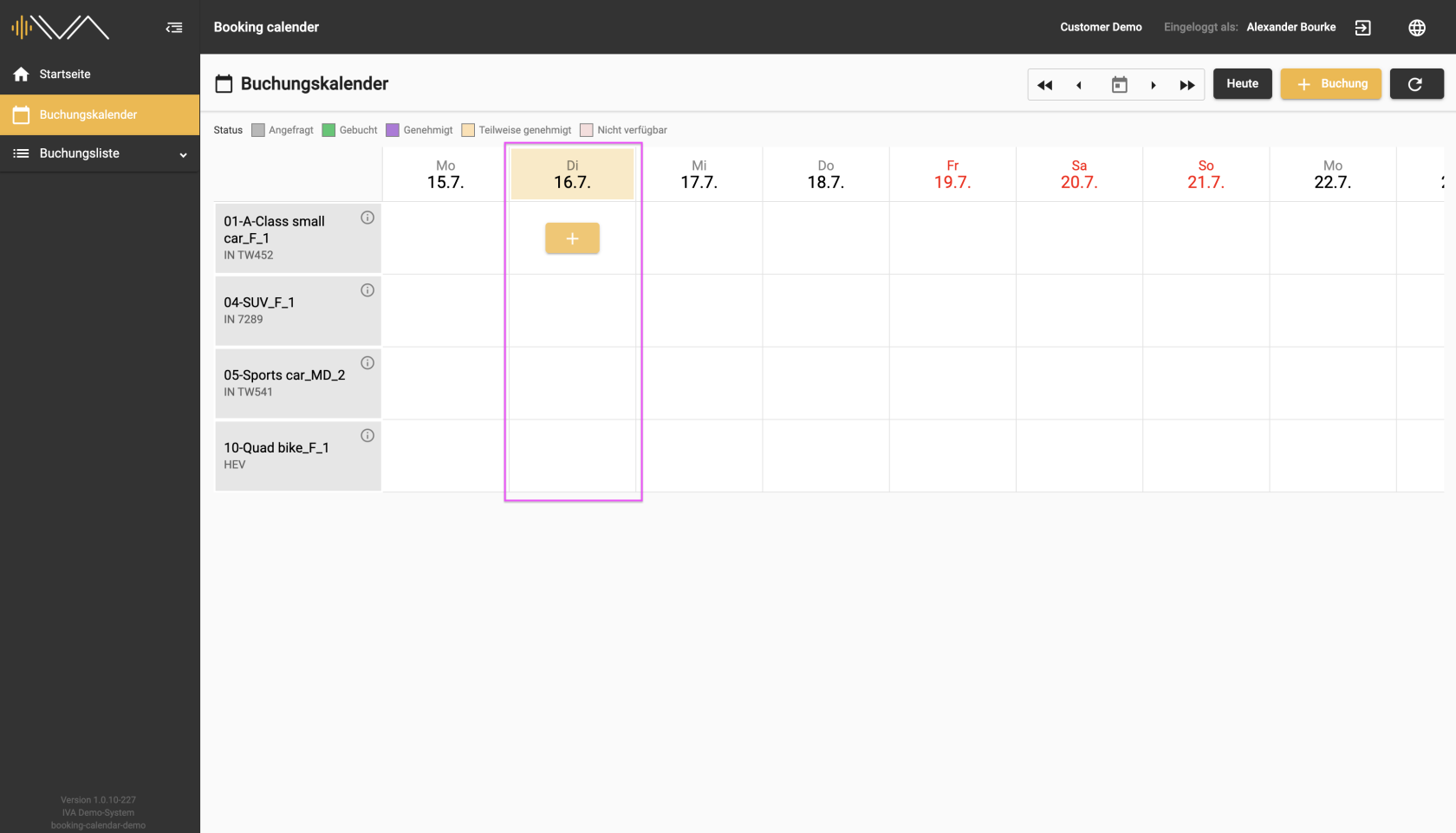
<span data-contrast="auto">The current day, weekday and date are always highlighted with a color. </span><span data-ccp-props="{"201341983":0,"335559739":0,"335559740":240}"> </span>

<span data-ccp-props="{"201341983":0,"335559739":0,"335559740":240}">[![2.1-Buchungskalender-Buchung-aktueller-Tag.png](https://manual.ivaluate.de/uploads/images/gallery/2024-07/scaled-1680-/2-1-buchungskalender-buchung-aktueller-tag.png)](https://manual.ivaluate.de/uploads/images/gallery/2024-07/2-1-buchungskalender-buchung-aktueller-tag.png)</span>

<span data-contrast="auto">Looking at the individual day, through hovering over it, you can find a “+” button. </span><span data-ccp-props="{"201341983":0,"335559739":0,"335559740":240}"> </span>

<span data-ccp-props="{"201341983":0,"335559739":0,"335559740":240}">[![2.1.2-Buchungskalender-Buchung-anlegen.png](https://manual.ivaluate.de/uploads/images/gallery/2024-07/scaled-1680-/2-1-2-buchungskalender-buchung-anlegen.png)](https://manual.ivaluate.de/uploads/images/gallery/2024-07/2-1-2-buchungskalender-buchung-anlegen.png)</span>

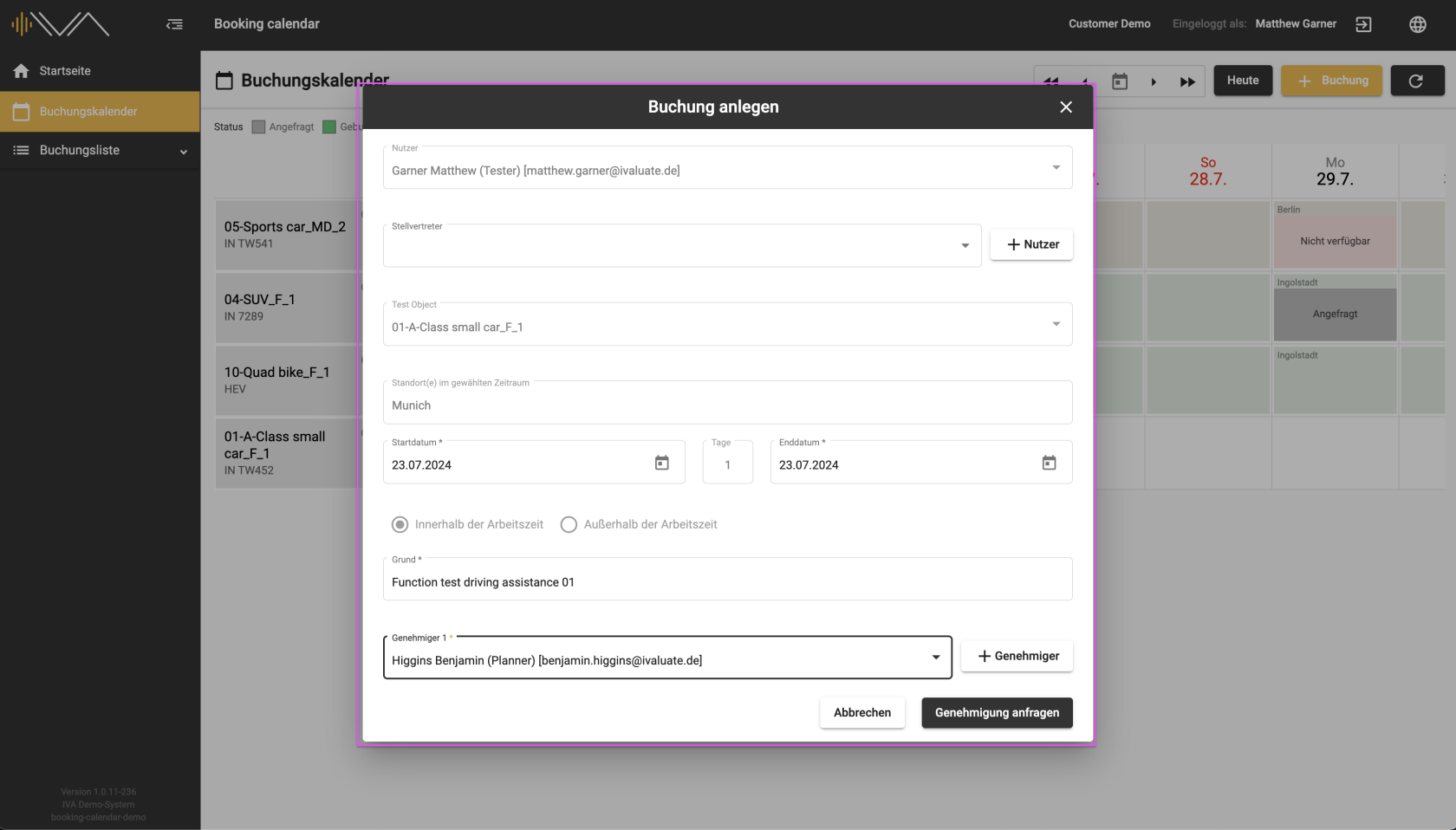
<span data-contrast="auto">Clicking on it opens a separate pop-up “Create booking” with the following information:</span><span data-ccp-props="{"201341983":0,"335559739":0,"335559740":240}"> </span>

- <span data-contrast="auto">**"User"**, automatically selected</span><span data-ccp-props="{"201341983":0,"335559739":0,"335559740":240}"> </span>
- **"Delegate"**
- <span data-contrast="auto">**"Test object"**, automatically selected</span><span data-ccp-props="{"201341983":0,"335559739":0,"335559740":240}"> </span>
- <span data-contrast="auto">**"Location"**, selected if the assignment has been selected</span><span data-ccp-props="{"201341983":0,"335559739":0,"335559740":240}"> </span>
- <span data-contrast="auto">Tax-relevant settings: </span><span data-ccp-props="{"201341983":0,"335559739":0,"335559740":240}"> </span>
- <span data-contrast="auto">two radio buttons: **“Within”** or **“Outside working hours”** </span><span data-ccp-props="{"201341983":0,"335559738":240,"335559739":240,"335559740":240}"> </span>
- <span data-contrast="auto">a checkbox: **“Personal company car available”** appears next to the selected radio button **“Outside working hours”** </span><span data-ccp-props="{"201341983":0,"335559738":240,"335559739":240,"335559740":240}"> </span>
- <span data-contrast="auto">a checkbox: **“Evaluate in IVA”** an optional setting, depending on the settings in the administration</span><span data-ccp-props="{"201341983":0,"335559739":0,"335559740":240}"> </span>
- <span data-contrast="auto">**"Start date"** and **"End date"**, automatically selected</span><span data-ccp-props="{"201341983":0,"335559739":0,"335559740":240}"> </span>
- **"Reason"**
- **"Approver 1"**
- <span data-contrast="auto">**"Approver 2"**, for drives outside working hours</span><span data-ccp-props="{"201341983":0,"335559739":0,"335559740":240}"> </span>

<span data-contrast="auto">You can change or add to your details during the booking process. To complete the booking process, please click on the “Request approval” button below. Your request will be saved and, in most cases, forwarded to the approver. Under the booked day and the corresponding vehicle tile, you will then see your name, part of the reason and the status “Requested”.</span><span data-ccp-props="{"201341983":0,"335559739":0,"335559740":240}"> </span>

<span data-contrast="auto">The second way to make a booking is by clicking on the “+ Booking” button. A separate pop-up “Create booking” will then open with the same details as above. The test object needs to be selected manually here. </span><span data-ccp-props="{"201341983":0,"335559739":0,"335559740":240}"> </span>

<span data-contrast="auto">After making a booking, you will see your requested booking in the booking list. The text line containing the booking information is colored orange. You can edit the booking afterwards by clicking on the “Pencil” icon. </span><span data-ccp-props="{"201341983":0,"335559739":0,"335559740":240}"> </span>

<span data-contrast="auto">More information can be found under the menu item <span style="background-color: #f1c40f;">“[Booking list](https://manual.ivaluate.de/books/en-booking-calendar-for-tester/chapter/30-booking-list-for-tester)”</span>.</span><span data-ccp-props="{"201341983":0,"335559739":0,"335559740":240}"> </span>

<span data-contrast="auto">If the test object is assigned a current location for a specific period, you will see the name of the location in a tile at the top left.</span><span data-ccp-props="{"201341983":0,"335559739":0,"335559740":240}"> </span>

<span data-contrast="auto">Mandatory information is marked with an “\*”.</span><span data-ccp-props="{"201341983":0,"335559739":0,"335559740":240}"> </span>

- - - - - -

##### **<span class="TextRun SCXW39919207 BCX4" data-contrast="auto" lang="EN-US" xml:lang="EN-US"><span class="NormalTextRun SCXW39919207 BCX4">QUARTER-HOURLY VIEW</span></span>**

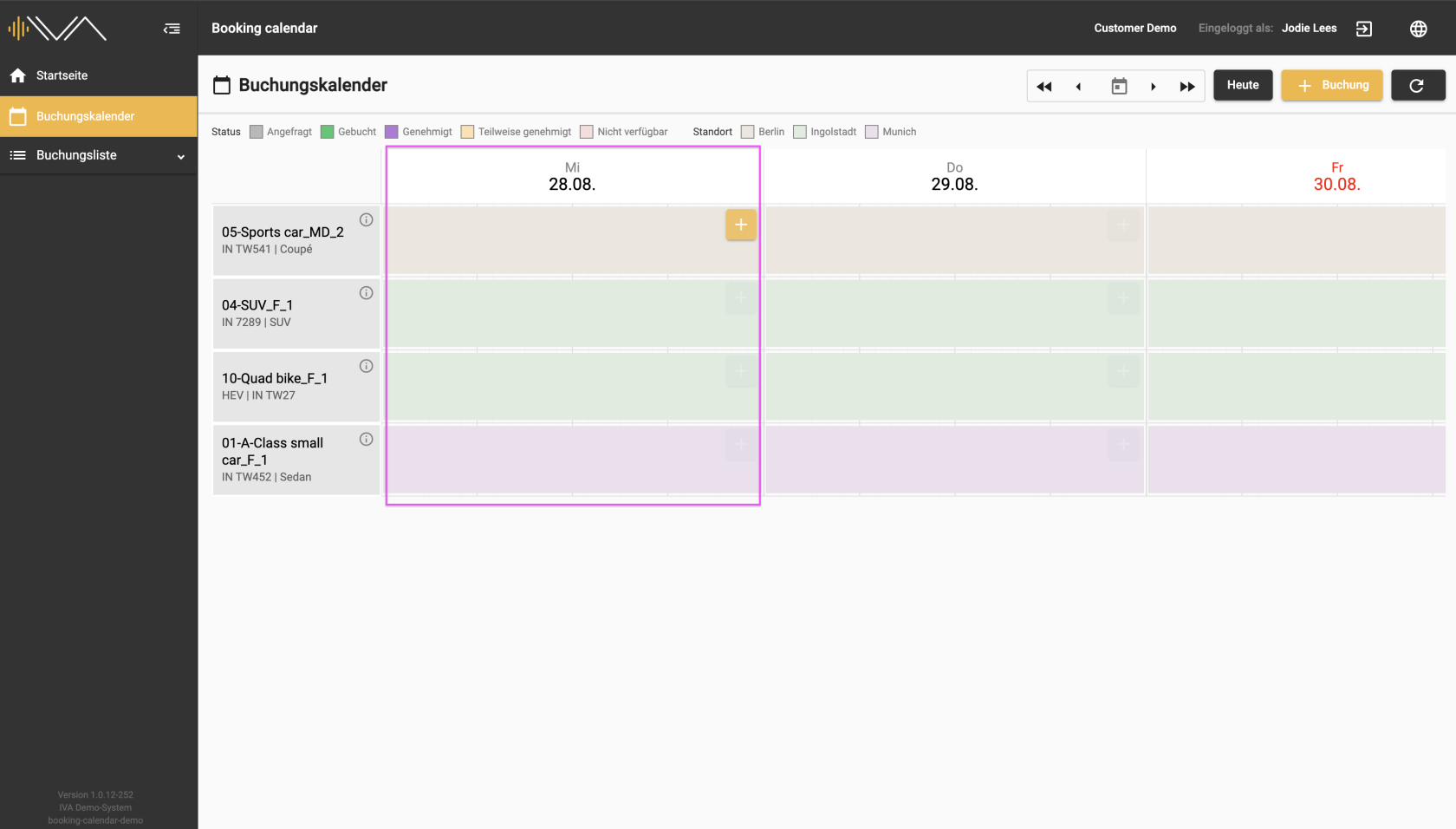
<span data-contrast="auto">The column for each day is wider here than in the “Daily view”. It is possible to book a test object for a day in a quarter-hourly cycle.</span><span data-ccp-props="{"201341983":0,"335559739":0,"335559740":240}"> </span>

[![2.1-IVA-Buchungskalender-Buchung-aktueller-Tag-viertelstündlich.png](https://manual.ivaluate.de/uploads/images/gallery/2024-08/scaled-1680-/2-1-iva-buchungskalender-buchung-aktueller-tag-viertelstundlich.png)](https://manual.ivaluate.de/uploads/images/gallery/2024-08/2-1-iva-buchungskalender-buchung-aktueller-tag-viertelstundlich.png)

<span data-contrast="auto">Looking at the individual day, through hovering over it, you can find a “+” button.</span><span data-ccp-props="{"201341983":0,"335559739":0,"335559740":240}"> </span>

<span data-ccp-props="{"201341983":0,"335559739":0,"335559740":240}">[![2.1.2-IVA-Buchungskalender-Buchung-anlegen-Tester-viertstündlich.png](https://manual.ivaluate.de/uploads/images/gallery/2024-08/scaled-1680-/2-1-2-iva-buchungskalender-buchung-anlegen-tester-viertstundlich.png)](https://manual.ivaluate.de/uploads/images/gallery/2024-08/2-1-2-iva-buchungskalender-buchung-anlegen-tester-viertstundlich.png)</span>

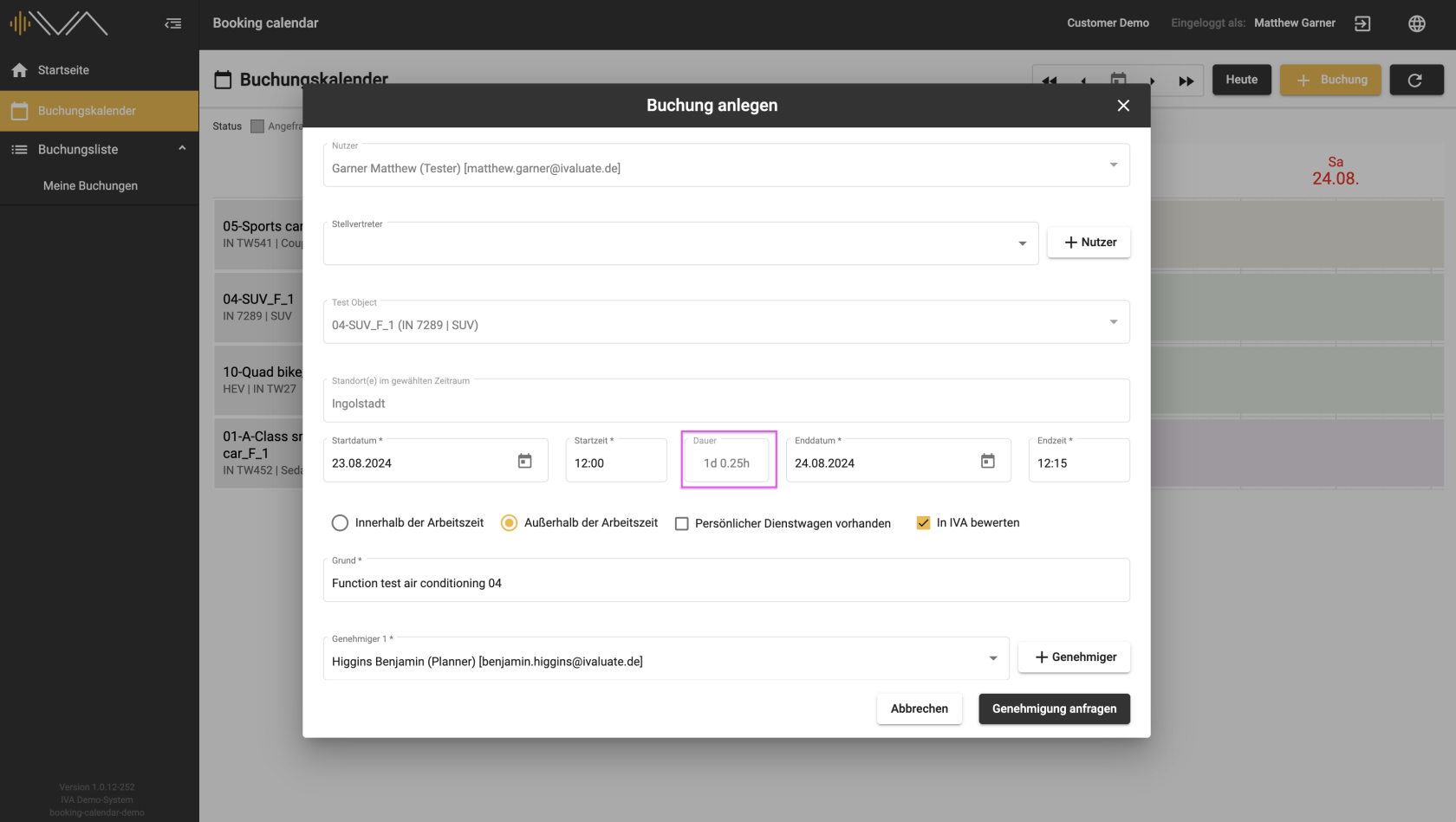
<span data-contrast="auto">Clicking on it opens a separate pop-up “Create booking” with the following information:</span><span data-ccp-props="{"201341983":0,"335559739":0,"335559740":240}"> </span>

- <span data-contrast="auto">**"User"**, automatically selected</span><span data-ccp-props="{"201341983":0,"335559739":0,"335559740":240}"> </span>
- **"Delegate"**
- <span data-contrast="auto">**"Test object"**, automatically selected</span><span data-ccp-props="{"201341983":0,"335559739":0,"335559740":240}"> </span>
- <span data-contrast="auto">**"Location"**, selected if the assignment has been selected</span><span data-ccp-props="{"201341983":0,"335559739":0,"335559740":240}"> </span>
- <span data-contrast="auto">**"Start date"** and **"End date"**, automatically selected</span><span data-ccp-props="{"201341983":0,"335559739":0,"335559740":240}"> </span>
- <span data-contrast="auto">**“Duration”**, automatically calculated</span><span data-ccp-props="{"201341983":0,"335559739":0,"335559740":240}"> </span>
- <span data-contrast="auto">Tax-relevant settings: </span><span data-ccp-props="{"201341983":0,"335559739":0,"335559740":240}"> </span>
- <span data-contrast="auto">two radio buttons: **“Within”** or **“Outside working hours”** </span><span data-ccp-props="{"201341983":0,"335559738":240,"335559739":240,"335559740":240}"> </span>
- <span data-contrast="auto">a checkbox: **“Personal company car available”** appears next to the selected radio button **“Outside working hours”** </span><span data-ccp-props="{"201341983":0,"335559738":240,"335559739":240,"335559740":240}"> </span>
- <span data-contrast="auto">a checkbox: **“Evaluate in IVA”** an optional setting, depending on the settings in the administration</span><span data-ccp-props="{"201341983":0,"335559739":0,"335559740":240}"> </span>
- **"Reason"**<span data-ccp-props="{"201341983":0,"335559739":0,"335559740":240}"> </span>
- **"Approver 1"**
- <span data-contrast="auto">**"Approver 2"**, for drives outside working hours</span><span data-ccp-props="{"201341983":0,"335559739":0,"335559740":240}"> </span>

<span data-contrast="auto">The checkbox: “evaluate in IVA” depends on the settings in the administration and is optionally available.</span><span data-ccp-props="{"201341983":0,"335559739":0,"335559740":240}"> </span>

<span data-contrast="auto">If the checkbox is selected, a test is created in IVA.</span>