# 3.1. Overview "My bookings" for planners

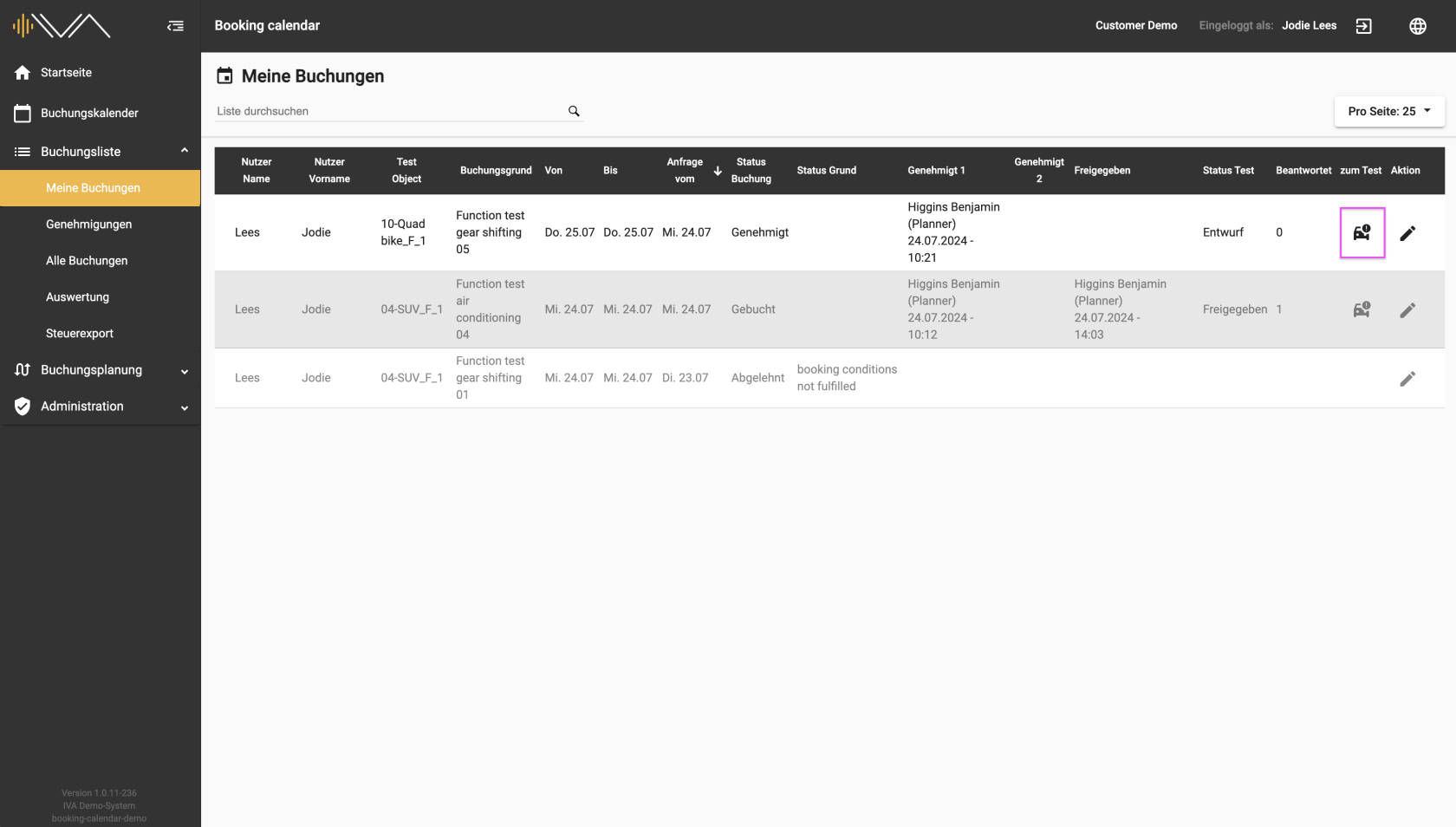
<span data-contrast="auto">The booking list provides you with an overview of all bookings that you have requested or booked. The list is made up of several columns. </span><span data-ccp-props="{"201341983":0,"335559739":0,"335559740":240}"> </span>

<span data-contrast="auto">On the left, there is a **“Test object”** column in which the test object name and the first two attributes are listed. </span><span data-ccp-props="{"201341983":0,"335559739":0,"335559740":240}"> </span>

<span data-contrast="auto">On the far right is the column: **“To test”**. If a drive has been approved, the column is filled with a “Car” icon. Clicking on the icon takes you to the corresponding test, i.e. a new tab opens in the tester web application.</span><span data-ccp-props="{"201341983":0,"335559739":0,"335559740":240}"> </span><span data-contrast="auto"> </span><span data-ccp-props="{"201341983":0,"335559739":0,"335559740":240}"> </span>

<span data-contrast="auto">[![3.1.1-IVA-Buchungskalender-Buchungsliste-Meine-Buchungen-Planer.png](https://manual.ivaluate.de/uploads/images/gallery/2024-07/scaled-1680-/3-1-1-iva-buchungskalender-buchungsliste-meine-buchungen-planer.png)](https://manual.ivaluate.de/uploads/images/gallery/2024-07/3-1-1-iva-buchungskalender-buchungsliste-meine-buchungen-planer.png)</span>

<span data-contrast="auto">The **“Status test”** and **“Answered”** columns can be sorted.</span><span data-ccp-props="{"201341983":0,"335559739":0,"335559740":240}"> </span>

<span data-contrast="auto">The tester only sees this one submenu item. All other submenu items listed below it are invisible to the tester.</span>