# 4. Booking planning

Planning for 
4.1. vehicles and 
4.2. questionnaires/-series 
can be performed in the booking planning.

# 4.1. Test objects

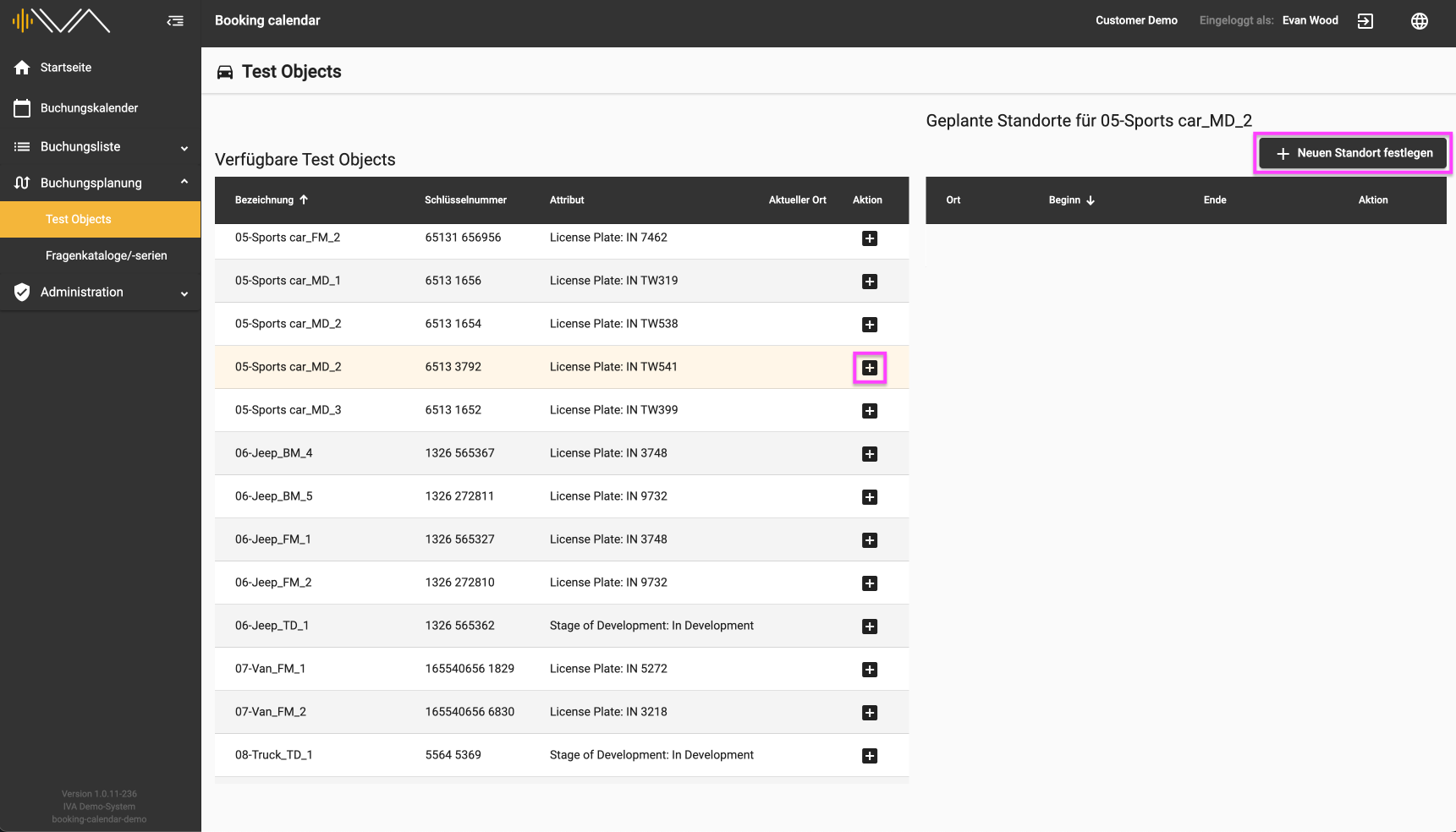
<span data-contrast="auto">Under the menu item “Test objects” you will find two tables. On the left is a table with “Available test objects”. </span><span data-ccp-props="{"201341983":0,"335559739":0,"335559740":240}"> </span>

<span data-ccp-props="{"201341983":0,"335559739":0,"335559740":240}">[![4.1-IVA-Buchungskalender-Buchungsplanung-Testobjekte-Standorte.png](https://manual.ivaluate.de/uploads/images/gallery/2024-07/scaled-1680-/QPY4-1-iva-buchungskalender-buchungsplanung-testobjekte-standorte.png)](https://manual.ivaluate.de/uploads/images/gallery/2024-07/QPY4-1-iva-buchungskalender-buchungsplanung-testobjekte-standorte.png)</span>

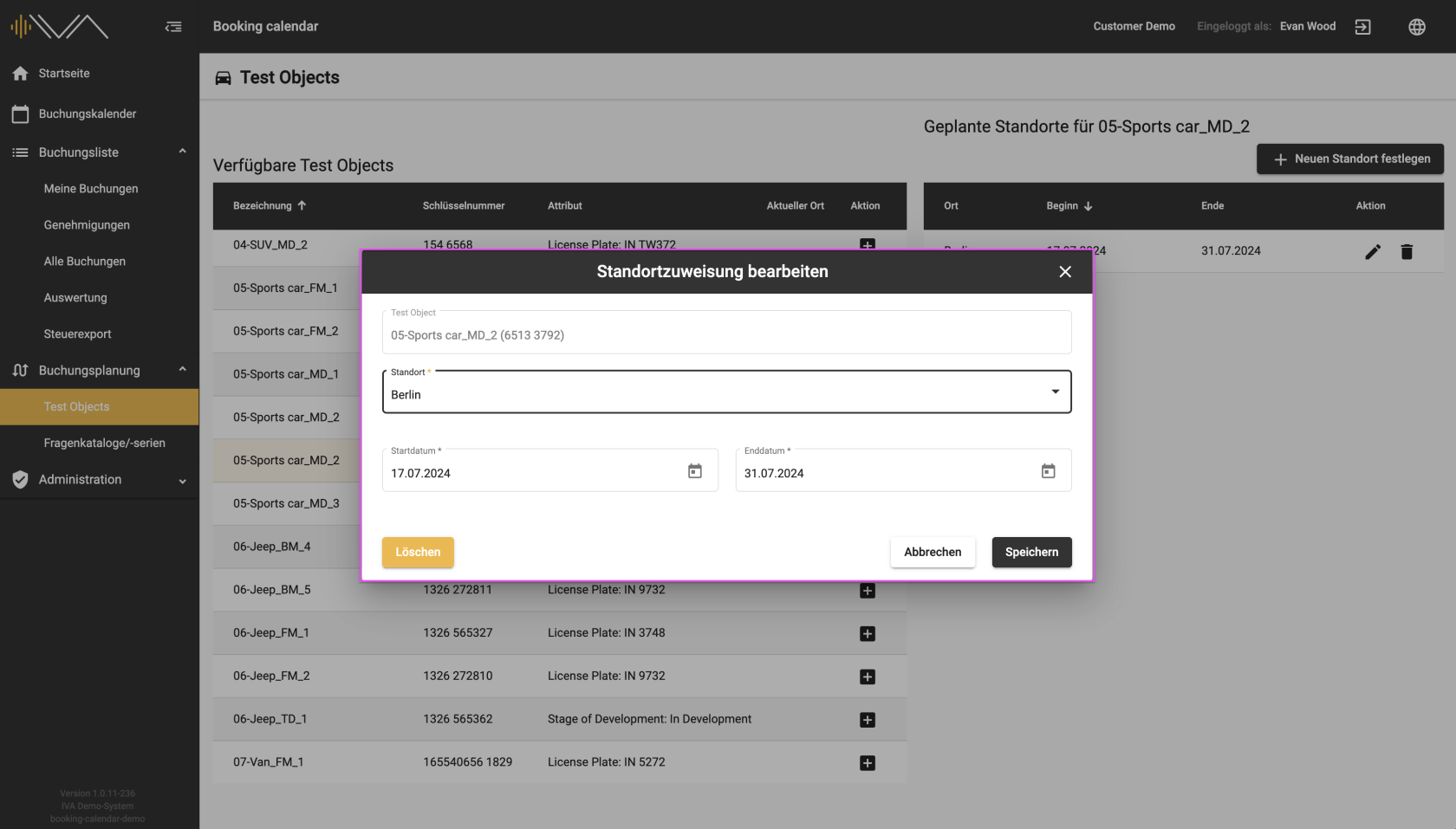
<span data-contrast="auto">If you click on a row with a test object, the tile is colored light yellow and you can perform an action by clicking on the “+” icon or by clicking on the “+ Set new location” button at the top right. A new window then appears in which you can assign the “Location” and the “Start” and “End date” to the corresponding vehicle.</span><span data-ccp-props="{"201341983":0,"335559739":0,"335559740":240}"> </span>

<span data-ccp-props="{"201341983":0,"335559739":0,"335559740":240}">[![4.1-IVA-Buchungskalender-Buchungsplanung-Testobjekte-Standortzuweisung-bearbeiten.png](https://manual.ivaluate.de/uploads/images/gallery/2024-07/scaled-1680-/4-1-iva-buchungskalender-buchungsplanung-testobjekte-standortzuweisung-bearbeiten.png)](https://manual.ivaluate.de/uploads/images/gallery/2024-07/4-1-iva-buchungskalender-buchungsplanung-testobjekte-standortzuweisung-bearbeiten.png)</span>

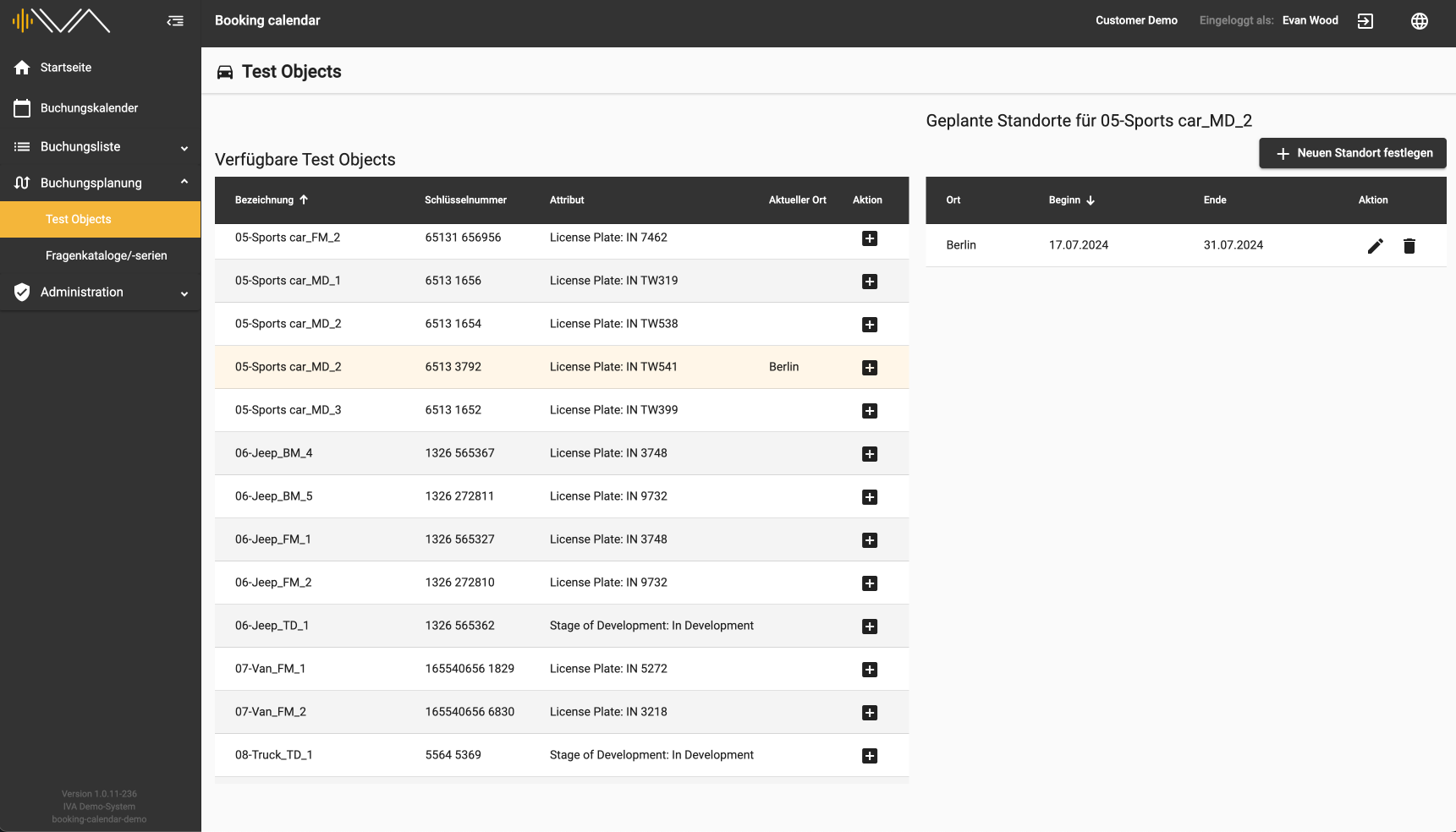
<span data-contrast="auto">A new row then appears with the location, start and end dates, which you can edit or delete.</span><span data-ccp-props="{"201341983":0,"335559739":0,"335559740":240}"> </span>

<span data-ccp-props="{"201341983":0,"335559739":0,"335559740":240}"><span style="font-family: Roboto;">[![4.1-IVA-Buchungskalender-Buchungsplanung-Testobjekte-Standorte.png](https://manual.ivaluate.de/uploads/images/gallery/2024-07/scaled-1680-/4-1-iva-buchungskalender-buchungsplanung-testobjekte-standorte.png)](https://manual.ivaluate.de/uploads/images/gallery/2024-07/4-1-iva-buchungskalender-buchungsplanung-testobjekte-standorte.png)</span></span>

<span data-contrast="auto">This allows you to assign “Planned locations” to each vehicle individually. These locations are automatically assigned in the booking calendar when creating a booking.</span><span data-ccp-props="{"201341983":0,"335559739":0,"335559740":240}"></span>

# 4.2. Questionnaires

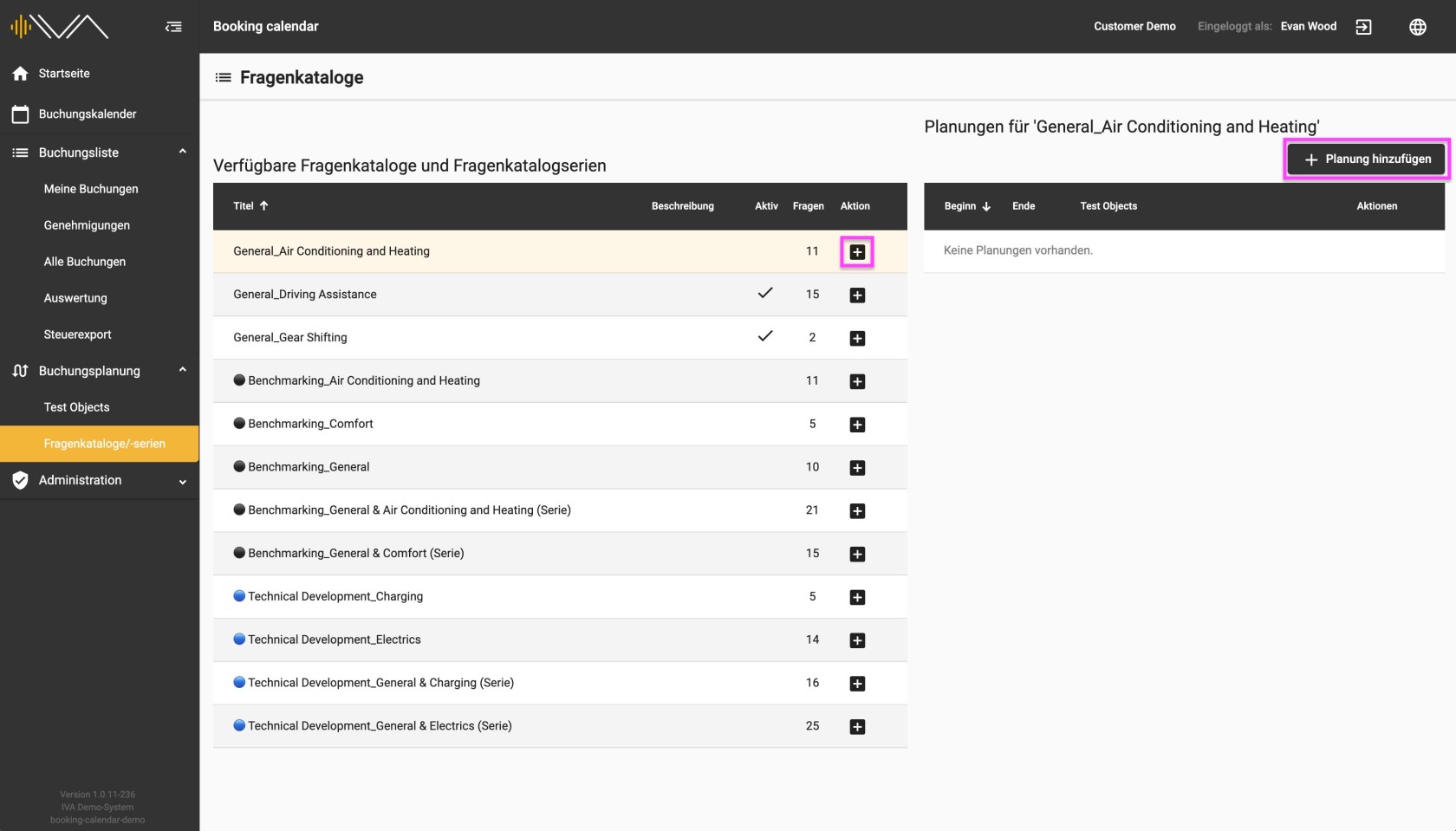
<span data-contrast="auto">Under the menu item “Question catalogs/series” you will find two tables. On the left is a table with “Available questionnaires and questionnaire series". </span><span data-ccp-props="{"201341983":0,"335559739":0,"335559740":240}"> </span>

<span data-ccp-props="{"201341983":0,"335559739":0,"335559740":240}">[![4.2-Buchungskalender-Buchungsplanung-Fragenkataloge-Übersicht.jpg](https://manual.ivaluate.de/uploads/images/gallery/2024-07/scaled-1680-/4-2-buchungskalender-buchungsplanung-fragenkataloge-ubersicht.jpg)](https://manual.ivaluate.de/uploads/images/gallery/2024-07/4-2-buchungskalender-buchungsplanung-fragenkataloge-ubersicht.jpg)</span>

<span data-contrast="auto">If you click on a row of the questionnaire/questionnaire series, the tile is colored light yellow and you can perform an action by clicking on the "+" icon or by clicking on the "+ Add planning" button at the top right. </span><span data-ccp-props="{"201341983":0,"335559739":0,"335559740":240}"> </span>

<span class="EOP SCXW210404464 BCX4" data-ccp-props="{"201341983":0,"335559739":0,"335559740":240}"><span style="font-family: Roboto;">[![4.2-Buchungskalender-Buchungsplanung-Fragenkataloge-Planung-hinzufügen.png](https://manual.ivaluate.de/uploads/images/gallery/2024-07/scaled-1680-/4-2-buchungskalender-buchungsplanung-fragenkataloge-planung-hinzufugen.png)](https://manual.ivaluate.de/uploads/images/gallery/2024-07/4-2-buchungskalender-buchungsplanung-fragenkataloge-planung-hinzufugen.png)</span></span>

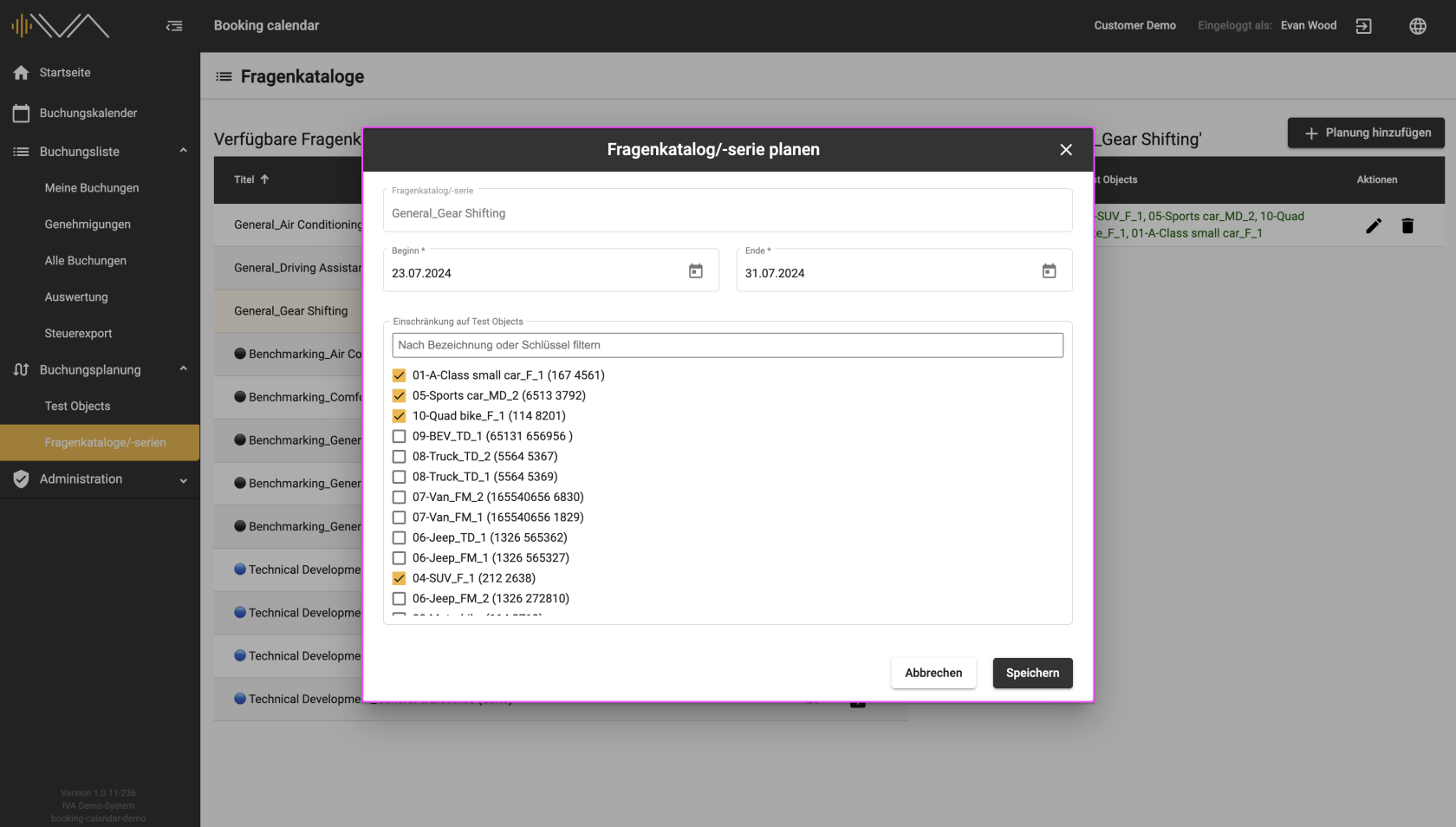
<span data-contrast="auto">A new window then appears in which you can assign the “Start date” and “End date” and also the vehicles listed to the corresponding questionnaire. In the list of test objects, you will see the name of the test object, the key value and the first two attributes listed in brackets. </span><span data-ccp-props="{"201341983":0,"335559739":0,"335559740":240}"> </span>

<span data-ccp-props="{"201341983":0,"335559739":0,"335559740":240}"> <span style="font-family: Roboto;">[![4.2-IVA-Buchungskalender-Buchungsplanung-Fragenkataloge-Übersicht-geplant.png](https://manual.ivaluate.de/uploads/images/gallery/2024-07/scaled-1680-/4-2-iva-buchungskalender-buchungsplanung-fragenkataloge-ubersicht-geplant.png)](https://manual.ivaluate.de/uploads/images/gallery/2024-07/4-2-iva-buchungskalender-buchungsplanung-fragenkataloge-ubersicht-geplant.png)</span></span>

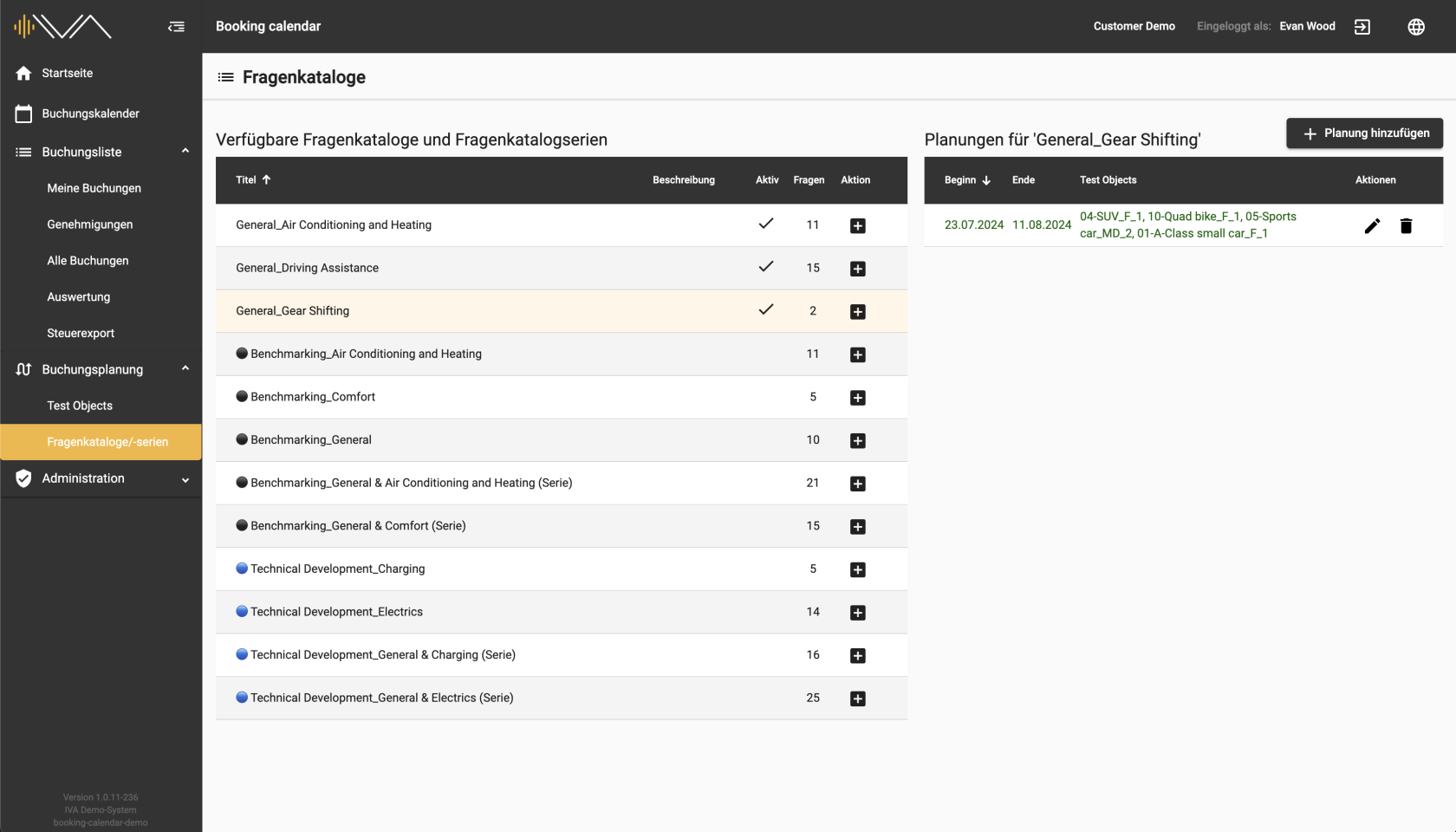
<span data-contrast="auto">A new line then appears with the start, end and vehicles, which you can edit or delete.</span><span data-ccp-props="{"201341983":0,"335559739":0,"335559740":240}"> </span>

<span data-contrast="auto">This allows you to assign individual “ Planning” to each question catalog. These plans are automatically assigned to the corresponding vehicle in the corresponding period and answered by the tester.</span>